
Table of Contents
ToggleIDM Features Explained
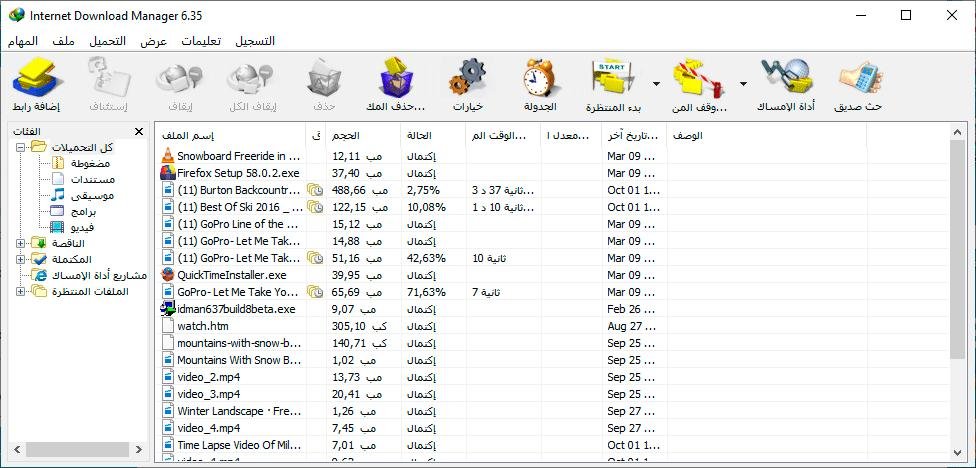
Internet Download Manager (IDM) is one of the most popular download management applications for Windows. Known for its speed, reliability, and ease of use, IDM has remained a favorite among users who regularly download software, videos, documents, games, and other large files.
While many people know IDM for its download acceleration capabilities, the software includes numerous features that improve download management, organization, and efficiency. In this guide, we’ll explain IDM’s most important features and how they benefit users in 2026.
What Is IDM?
Internet Download Manager is a Windows-based download manager designed to increase download speeds, organize files, and simplify the downloading process.
Unlike standard browser download tools, IDM offers advanced features such as:
- Download acceleration.
- Resume capability.
- Browser integration.
- Download scheduling.
- Video downloading.
- File categorization.
These features make IDM one of the most powerful download managers available today.
Overview of IDM Features
Main Features at a Glance
| Feature | Purpose |
|---|---|
| Download Acceleration | Speeds up downloads |
| Resume Downloads | Continues interrupted downloads |
| Browser Integration | Captures downloads automatically |
| Download Scheduler | Automates download tasks |
| Video Grabber | Detects downloadable videos |
| Batch Downloads | Downloads multiple files |
| Error Recovery | Handles connection issues |
| File Categories | Organizes downloaded content |
Each feature is designed to make downloading faster and more convenient.
1. Download Acceleration
Download acceleration is IDM’s most well-known feature.
Instead of downloading a file through a single connection, IDM divides the file into multiple parts and downloads those parts simultaneously.
Benefits
- Faster download completion.
- Better bandwidth usage.
- Improved efficiency.
- Reduced waiting time.
How It Works
This technology is one reason why IDM remains popular among heavy downloaders.
2. Resume Interrupted Downloads
Internet connections aren’t always stable. Power outages, network disruptions, and system restarts can interrupt downloads.
IDM’s resume feature allows users to continue downloads from where they stopped.
Advantages
- Saves bandwidth.
- Saves time.
- Prevents restarting large downloads.
- Improves reliability.
This feature is especially useful when downloading large files.
3. Browser Integration
IDM integrates directly with most major web browsers.
Supported Browsers
| Browser | Supported |
|---|---|
| Google Chrome | Yes |
| Mozilla Firefox | Yes |
| Microsoft Edge | Yes |
| Opera | Yes |
| Brave | Yes |
When IDM detects downloadable content, it automatically displays a download option.
This seamless integration improves the user experience significantly.
4. Download Scheduler
The Scheduler feature helps users automate downloads.
Instead of manually starting downloads, users can set specific times for IDM to begin downloading files.
Scheduling Benefits
| Benefit | Description |
|---|---|
| Time Management | Automates downloads |
| Night Downloads | Uses idle hours |
| Queue Control | Manages multiple downloads |
| Bandwidth Planning | Reduces network congestion |
This feature is useful for large downloads that can run overnight.
5. Video Downloading
One of IDM’s most popular features is its ability to detect downloadable videos on supported websites.
When a video is detected, IDM often displays a download button automatically.
Benefits
- One-click downloading.
- Multiple quality options.
- Faster video downloads.
- Easy media management.
Many users choose IDM specifically for its video downloading capabilities.
6. Batch Downloading
Downloading files one at a time can be inefficient.
IDM’s batch downloading feature allows users to download multiple files simultaneously.
Common Uses
- Software packages.
- Image collections.
- Documents.
- Course materials.
- Media libraries.
Batch downloading saves considerable time when handling large numbers of files.
Final Thoughts
Internet Download Manager offers much more than simple download acceleration. Features such as browser integration, video downloading, scheduling, resume support, batch downloads, file categorization, and error recovery make it one of the most comprehensive download management tools available for Windows.
Whether you’re downloading large software packages, media files, online videos, or educational materials, IDM provides the tools needed to make downloads faster, safer, and more organized. Even in 2026, it remains a top choice for users who want greater control over their downloading experience.