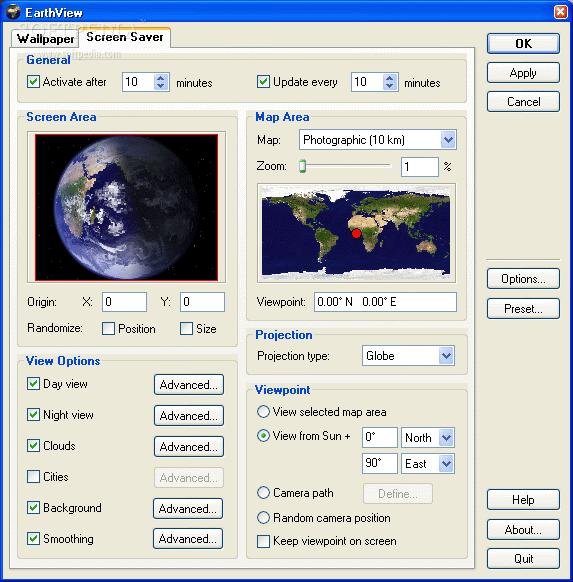
Desktop wallpapers have evolved far beyond static images, and EarthView is one of the best examples of this transformation. Instead of displaying a single picture, EarthView generates realistic, constantly changing views of our planet directly on your desktop. The software combines geographical data, astronomical calculations, and advanced rendering techniques to create what appears to be a live view of Earth from space.
In this article, we’ll explore how EarthView creates its impressive live Earth wallpapers and why it continues to be a favorite among desktop customization enthusiasts.
Table of Contents
ToggleWhat Is a Live Earth Wallpaper?
A live Earth wallpaper is a dynamic desktop background that changes over time to reflect real-world conditions. Unlike traditional wallpapers, EarthView continuously updates the appearance of the planet based on factors such as daylight, nighttime, cloud cover, and seasonal changes.
The result is a desktop background that feels alive and always looks different depending on the time of day.
Core Technologies Behind EarthView
EarthView uses several technologies working together to create realistic Earth imagery.
Key Components
| Technology | Purpose |
|---|---|
| Global Maps | Provides detailed Earth surface data |
| Astronomical Calculations | Determines day and night regions |
| Real-Time Rendering | Generates dynamic images |
| Atmospheric Effects | Creates realistic lighting |
| Cloud Simulation | Adds weather-like visuals |
| Seasonal Modeling | Reflects seasonal changes |
These elements combine to produce a realistic representation of Earth from space.
Real-Time Day and Night Simulation
One of EarthView’s most impressive features is its ability to display the Earth’s day and night cycle accurately.
The software calculates the position of the sun relative to the Earth and determines which regions are currently experiencing daylight and which are in darkness. As time passes, the illuminated portion of the globe gradually shifts.
This creates a realistic transition between sunrise, daylight, sunset, and nighttime.
City Lights at Night
EarthView enhances realism by displaying illuminated cities during nighttime hours. Large metropolitan areas appear as bright clusters of light, similar to photographs captured from satellites orbiting Earth.
This feature adds visual depth and makes nighttime views especially attractive on high-resolution monitors.
The city light effect is based on geographical population data and urban development patterns rather than simple random lighting.
Cloud and Atmospheric Effects
To make Earth appear more realistic, EarthView includes cloud layers and atmospheric lighting effects.
Cloud formations move across continents and oceans, helping create the impression of a living planet. The software also simulates atmospheric glow around the Earth’s edge, producing the familiar blue halo seen in many space photographs.
These visual enhancements significantly improve the overall appearance of the wallpaper.
Seasonal Changes and Earth Rotation
Different regions may appear slightly different depending on the current season.
For example:
- Snow-covered areas become more visible during winter.
- Vegetation appears greener during growing seasons.
- Daylight duration changes throughout the year.
The software can additionally simulate Earth rotation, creating continuously changing viewpoints that make the desktop feel dynamic and engaging.
Rendering Process
EarthView does not stream live satellite footage. Instead, it generates images locally using stored map data and mathematical calculations.
Simplified Rendering Workflow
| Step | Action |
|---|---|
| 1 | Load Earth surface maps |
| 2 | Calculate sun position |
| 3 | Determine day and night zones |
| 4 | Apply city light effects |
| 5 | Add cloud and atmosphere layers |
| 6 | Generate final wallpaper image |
| 7 | Update desktop background |
This process allows EarthView to run efficiently without requiring a constant internet connection.
Performance and Efficiency
Despite its sophisticated visuals, EarthView is surprisingly lightweight. The software uses optimized rendering techniques that consume minimal system resources.
Benefits include:
- Low CPU usage.
- Fast wallpaper updates.
- Smooth performance.
- Compatibility with older computers.
- Support for HD and 4K displays.
This efficiency helps EarthView remain popular among users who want attractive desktop effects without sacrificing performance.
Why Users Love EarthView
EarthView stands out because it combines scientific accuracy with visual beauty. Users appreciate the constantly changing landscapes, realistic day-night transitions, and detailed Earth imagery.
For many people, it transforms an ordinary desktop into an interactive window overlooking our planet.
Final Thoughts
EarthView creates live Earth wallpapers by combining geographical mapping data, astronomical calculations, atmospheric effects, cloud rendering, and seasonal modeling. Rather than displaying a static image, the software continuously generates realistic views of Earth that evolve throughout the day.
The result is a beautiful, dynamic desktop experience that remains one of the most impressive wallpaper solutions available. Whether you’re interested in geography, astronomy, or simply want a more engaging desktop, EarthView offers a unique way to bring the planet to your screen.