A high-quality webcam is only part of the equation when it comes to creating professional-looking videos, attending virtual meetings, or live streaming online. The right webcam software can significantly improve your experience by providing advanced controls, video effects, recording features, and streaming capabilities. Whether you’re a student, remote worker, content creator, or gamer, choosing the best webcam software for your Windows PC can help you get the most out of your camera.
In this guide, we’ll explore some of the best webcam software available for Windows users and discuss their key features.
Why Webcam Software Matters
Many webcams work immediately after being connected to a computer, but default camera applications often offer limited functionality. Dedicated webcam software gives users greater control over video quality, brightness, contrast, zoom, recording settings, and special effects.
Benefits of webcam software include:
- Better video quality adjustments.
- Screen and webcam recording.
- Live streaming integration.
- Virtual backgrounds.
- Video effects and filters.
- Improved privacy and security controls.
Top Webcam Software for Windows PCs
Comparison Table
| Software | Best For | Free Version | Recording | Streaming Support |
|---|---|---|---|---|
| OBS Studio | Live Streaming | Yes | Yes | Yes |
| ManyCam | Video Effects | Yes | Yes | Yes |
| YouCam | Personal & Business Use | Limited | Yes | Yes |
| Logitech Capture | Logitech Webcams | Yes | Yes | Yes |
| SplitCam | Multi-Platform Streaming | Yes | Yes | Yes |
1. OBS Studio
OBS Studio is one of the most popular webcam and streaming applications available today. It is completely free and provides powerful features for recording videos and live streaming.
Users can create multiple scenes, add overlays, capture screens, and integrate webcam feeds with ease. It is particularly popular among YouTubers, Twitch streamers, and professional content creators.
Pros
- Free and open-source.
- Advanced recording options.
- Professional streaming tools.
- Highly customizable.
Cons
- Learning curve for beginners.
2. ManyCam
ManyCam is designed for users who want to add creativity to their video calls and streams. It offers virtual backgrounds, effects, text overlays, and support for multiple video sources.
This software is ideal for online teachers, presenters, and business professionals who want engaging video presentations.
3. YouCam
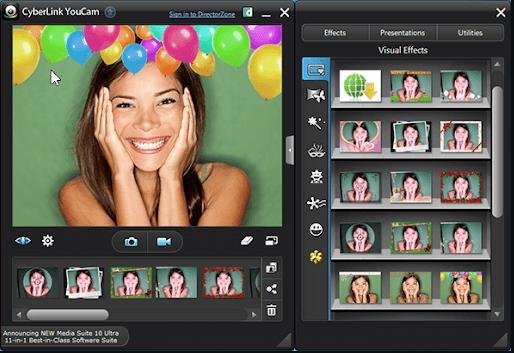
YouCam combines webcam enhancement tools with user-friendly controls. It provides beauty filters, lighting adjustments, facial tracking, and presentation features.
It is a good choice for business meetings, webinars, and personal video chats.
4. Logitech Capture
For users with Logitech webcams, Logitech Capture offers dedicated controls and recording tools. The software allows users to customize camera settings and create professional-looking content with minimal effort.
Its simple interface makes it suitable for beginners while still offering useful advanced features.
5. SplitCam
SplitCam allows users to stream to multiple platforms simultaneously while applying effects and filters to webcam feeds. It is a useful tool for streamers looking to expand their audience across different services.
The software also supports screen sharing and video recording.
Which Webcam Software Should You Choose?
Your ideal webcam software depends on your needs:
- For streaming: OBS Studio.
- For online teaching: ManyCam.
- For business meetings: YouCam.
- For Logitech webcam owners: Logitech Capture.
- For multi-platform streaming: SplitCam.
Final Verdict
The best webcam software for Windows PCs depends on how you use your webcam. OBS Studio remains the top choice for advanced streaming and recording, while ManyCam and YouCam are excellent for presentations and video conferencing. Logitech Capture works perfectly with Logitech devices, and SplitCam offers unique multi-streaming capabilities.
No matter your experience level, investing in quality webcam software can improve your video quality, productivity, and overall online presence.