
Table of Contents
ToggleBest Presentation Software for Business
In today’s competitive business environment, presentations play a crucial role in communication, sales, marketing, training, and decision-making. Whether you’re pitching to investors, presenting quarterly reports, conducting employee training, or showcasing products to clients, the right presentation software can make a significant difference.
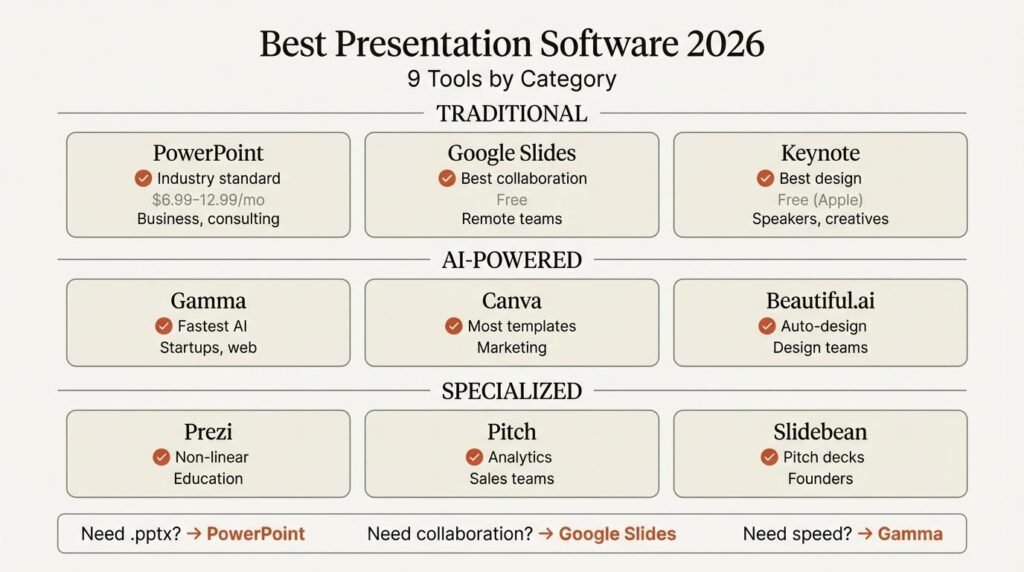
While Microsoft PowerPoint remains a popular choice, several modern alternatives now offer advanced collaboration, cloud-based access, AI-powered design tools, and interactive presentation features. In this guide, we’ll explore the best presentation software for business in 2026 and compare their strengths to help you choose the right solution.
Why Businesses Need Professional Presentation Software
Effective presentation tools help organizations communicate ideas clearly and professionally.
Key Benefits
- Improved team collaboration.
- Professional slide design.
- Better audience engagement.
- Enhanced data visualization.
- Faster presentation creation.
- Cloud accessibility.
Modern presentation software can save valuable time while helping businesses create impactful presentations.
Top Presentation Software Compared
| Software | Best For | Collaboration | Cloud Access | Ease of Use |
|---|---|---|---|---|
| Microsoft PowerPoint | Corporate Presentations | Excellent | Yes | Very Good |
| Google Slides | Team Collaboration | Excellent | Yes | Excellent |
| Canva Presentations | Visual Design | Very Good | Yes | Excellent |
| Prezi | Interactive Presentations | Good | Yes | Good |
| Visme | Marketing & Reports | Good | Yes | Very Good |
| Keynote | Apple Businesses | Good | Yes | Very Good |
This comparison provides a quick overview of the most popular business presentation tools available today.
1. Microsoft PowerPoint
Microsoft PowerPoint remains the industry standard for business presentations. It offers powerful design tools, advanced animations, multimedia integration, and compatibility across various devices.
Best Features
- Professional templates.
- Advanced chart creation.
- Presenter View.
- Real-time collaboration.
- Microsoft 365 integration.
Advantages
- Widely accepted in business environments.
- Extensive feature set.
- Strong compatibility with enterprise systems.
Drawbacks
- Some premium features require a subscription.
2. Google Slides
Google Slides is one of the most popular cloud-based presentation platforms for businesses.
Its real-time collaboration features allow multiple team members to work on presentations simultaneously from different locations.
Advantages
- Free for most users.
- Automatic cloud saving.
- Excellent collaboration tools.
- Easy sharing options.
Drawbacks
- Fewer advanced design features than PowerPoint.
3. Canva Presentations
Canva has become a favorite among marketers, startups, and small businesses due to its intuitive drag-and-drop design tools.
Even users with no design experience can create visually appealing presentations quickly.
Key Features
| Feature | Benefit |
|---|---|
| Templates | Faster slide creation |
| Stock Images | Professional visuals |
| Brand Kits | Consistent company branding |
| Collaboration | Team editing support |
Canva is especially useful for marketing presentations and client proposals.
4. Prezi
Prezi offers a unique approach to presentations by using a zoomable canvas instead of traditional slides.
This style can make presentations more engaging and memorable.
Advantages
- Interactive storytelling.
- Dynamic visual navigation.
- Engaging audience experience.
Drawbacks
- Steeper learning curve.
- Not ideal for every business presentation.
5. Visme
Visme combines presentation software with data visualization and infographic design tools.
It is particularly useful for businesses that frequently present statistics, reports, and marketing data.
Best Uses
- Business reports.
- Marketing presentations.
- Sales proposals.
- Infographics.
- Data-driven presentations.
Advantages
- Strong visualization tools.
- Professional templates.
- Marketing-focused features.
6. Keynote
For organizations that primarily use Apple devices, Keynote offers a polished presentation experience.
The software includes elegant templates, smooth animations, and seamless integration with the Apple ecosystem.
Advantages
- Free for Apple users.
- Attractive slide designs.
- Excellent performance.
Drawbacks
- Limited availability on non-Apple platforms.
Best Software by Business Need
Recommended Solutions
| Business Need | Recommended Software |
|---|---|
| Corporate Meetings | PowerPoint |
| Team Collaboration | Google Slides |
| Marketing Campaigns | Canva |
| Sales Pitches | Prezi |
| Business Reports | Visme |
| Apple-Based Teams | Keynote |
Selecting software based on your specific business requirements can improve efficiency and presentation quality.
Features Businesses Should Look For
Before choosing presentation software, consider the following features:
Essential Features
- Collaboration tools.
- Cloud storage.
- Professional templates.
- Data visualization.
- Multimedia support.
- Mobile accessibility.
- Security features.
Businesses often benefit most from software that combines strong design capabilities with teamwork features.
Free vs Paid Presentation Software
Comparison Table
| Feature | Free Software | Paid Software |
|---|---|---|
| Templates | Basic | Extensive |
| Collaboration | Limited to Good | Advanced |
| Storage | Limited | Expanded |
| Branding Tools | Basic | Professional |
| Support | Community-Based | Dedicated Support |
Small businesses may find free tools sufficient, while larger organizations often benefit from premium solutions.
Final Verdict
The best presentation software for business depends on your company’s goals and workflow. Microsoft PowerPoint remains the most comprehensive solution for corporate presentations, while Google Slides excels at team collaboration. Canva is ideal for visually engaging marketing materials, Prezi offers interactive storytelling, Visme specializes in data-driven content, and Keynote serves Apple-focused organizations exceptionally well.
In 2026, businesses have more presentation software options than ever before. By selecting the right tool for your needs, you can create professional presentations that communicate ideas effectively, engage audiences, and support business success.