
Table of Contents
ToggleInternet Download Manager (IDM) Review
Internet Download Manager (IDM) is one of the most popular download management tools available for Windows users. For years, it has been known for increasing download speeds, organizing files, and providing reliable download resumption capabilities. Despite the rise of modern browsers with built-in download managers, IDM continues to be a favorite among users who frequently download large files, videos, software, and documents.
In this review, we’ll examine IDM’s features, performance, advantages, disadvantages, and whether it’s still worth using in 2026.
Key Features of IDM
IDM offers numerous features that make downloading easier and more efficient.
Feature Overview
| Feature | Description |
|---|---|
| Download Acceleration | Speeds up file downloads |
| Resume Capability | Continue interrupted downloads |
| Browser Integration | Works with popular browsers |
| Download Scheduler | Automates downloads |
| Video Downloading | Detects downloadable videos |
| Batch Downloads | Download multiple files at once |
| File Organization | Categorizes downloads automatically |
| Error Recovery | Handles connection interruptions |
These features make IDM useful for both casual and power users.
User Interface and Ease of Use
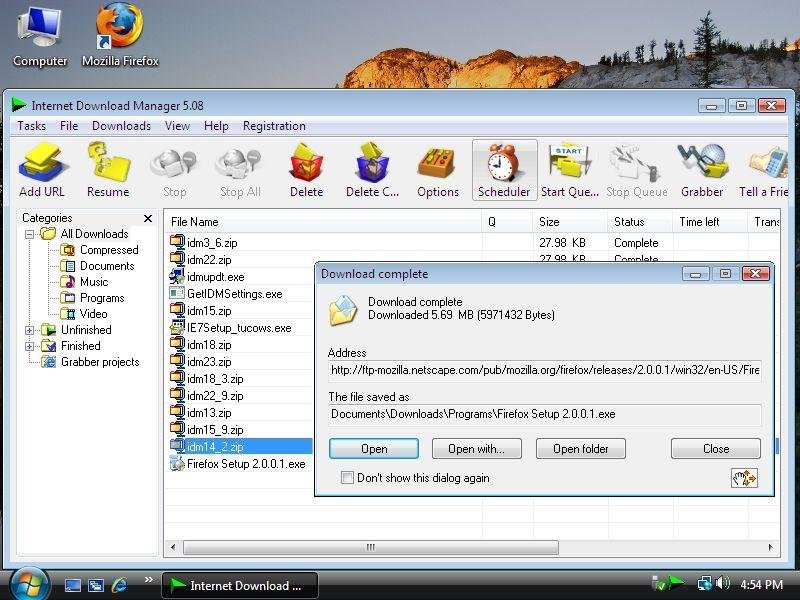
One reason for IDM’s popularity is its simple and user-friendly interface. New users can quickly understand the layout without requiring technical knowledge.
The main dashboard provides access to:
- Active downloads.
- Download queue.
- Scheduled tasks.
- Completed downloads.
- File categories.
Most downloads can be started with just a few clicks.
Download Speed Performance
The primary selling point of IDM is download acceleration.
Instead of downloading files through a single connection, IDM creates multiple download segments and retrieves them simultaneously. This often results in noticeably faster download speeds, especially for large files.
Performance Benefits
| Advantage | Benefit |
|---|---|
| Multi-Part Downloads | Faster transfer rates |
| Connection Recovery | Less risk of failed downloads |
| Automatic Retry | Handles network interruptions |
| Queue Management | Better download organization |
Actual speed improvements depend on internet connection quality and server limitations.
Browser Integration
IDM integrates with most popular web browsers.
Supported Browsers
| Browser | Supported |
|---|---|
| Google Chrome | Yes |
| Microsoft Edge | Yes |
| Mozilla Firefox | Yes |
| Opera | Yes |
| Brave | Yes |
When properly installed, IDM automatically detects downloadable files and displays download options within the browser.
This feature is especially convenient for users who regularly download media content.
Video Downloading Features
One of IDM’s most popular capabilities is video detection.
When visiting supported websites, IDM can often detect available video streams and provide download options.
Benefits
- Easy video downloads.
- Multiple quality selections.
- Fast download speeds.
- Simple one-click operation.
This feature has contributed significantly to IDM’s long-term popularity.
Pros and Cons
Pros
- Fast download acceleration.
- Reliable resume functionality.
- Excellent browser integration.
- Simple interface.
- Supports scheduled downloads.
- Stable performance.
- Handles large files efficiently.
Cons
- Windows-only software.
- Requires a paid license after trial period.
- Interface design feels somewhat dated.
- Some websites may limit download acceleration.
Despite a few drawbacks, IDM remains one of the most capable download managers available.
IDM vs Browser Download Managers
Many modern browsers include built-in download tools, but IDM offers several advantages.
Comparison Table
| Feature | IDM | Browser Download Manager |
|---|---|---|
| Download Acceleration | Yes | Limited |
| Resume Downloads | Excellent | Basic |
| Scheduling | Yes | No |
| Batch Downloads | Yes | Limited |
| File Organization | Advanced | Basic |
| Large File Handling | Excellent | Moderate |
Users who frequently download large files generally benefit more from IDM.
Resource Usage
IDM is lightweight compared to many modern applications.
System Impact
| Category | Performance |
|---|---|
| CPU Usage | Low |
| RAM Usage | Low |
| Startup Speed | Fast |
| Background Activity | Minimal |
Even older Windows computers can run IDM without significant performance issues.
Final Verdict
Internet Download Manager continues to be one of the best download management tools for Windows users. Its fast download speeds, dependable resume capabilities, strong browser integration, and efficient file management features make it a worthwhile investment for anyone who frequently downloads large files.
Although modern browsers have improved their built-in download tools, IDM still offers superior control, organization, and performance. For power users, students, professionals, and media enthusiasts, IDM remains a highly recommended download manager in 2026.