
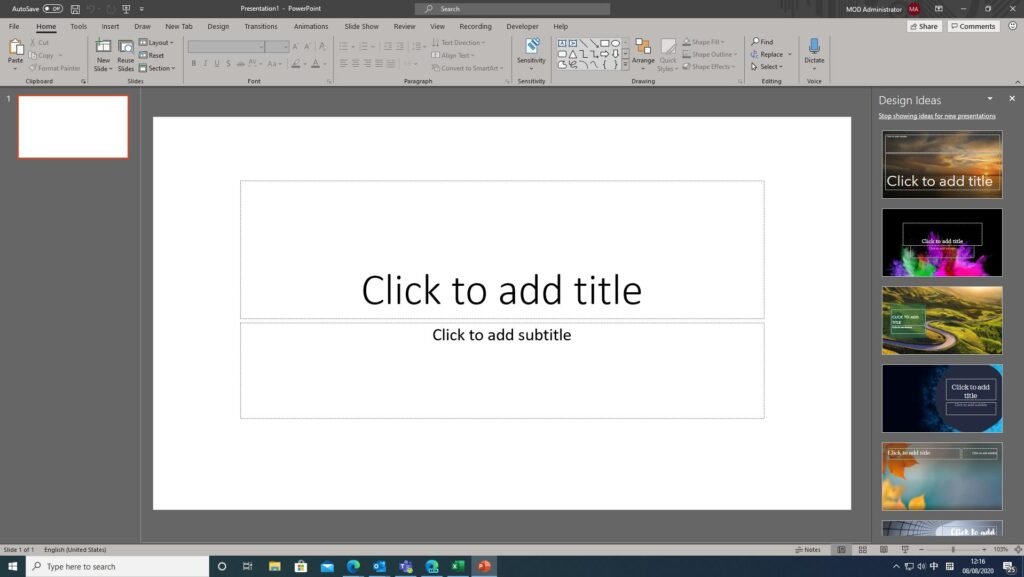
Microsoft PowerPoint is one of the world’s most widely used presentation applications. Whether you’re a student creating a class project, a business professional preparing a meeting, or a teacher designing lessons, PowerPoint provides the tools needed to create engaging presentations quickly and efficiently.
For beginners, PowerPoint is often the first presentation software they encounter due to its user-friendly interface and extensive feature set.
What Is Microsoft PowerPoint?
Microsoft PowerPoint is a presentation program included in the Microsoft Office and Microsoft 365 suites. It allows users to create slides containing text, images, charts, videos, animations, and other multimedia elements.
PowerPoint presentations are commonly used for:
- School assignments.
- Business meetings.
- Marketing presentations.
- Training sessions.
- Online webinars.
- Conference speeches.
Its versatility makes it one of the most popular productivity tools available today.
Key Features of PowerPoint
PowerPoint includes a wide range of features that help users create professional-looking presentations.
Feature Overview
| Feature | Description |
|---|---|
| Slide Templates | Ready-made presentation designs |
| Animations | Motion effects for text and objects |
| Transitions | Visual effects between slides |
| Charts & Graphs | Data visualization tools |
| Multimedia Support | Images, videos, and audio |
| Collaboration | Real-time teamwork features |
| Presenter View | Advanced presentation controls |
| Cloud Integration | Access files from anywhere |
These features make PowerPoint suitable for both beginners and experienced users.
User Interface and Ease of Use
One of PowerPoint’s biggest strengths is its intuitive design. The ribbon-based interface organizes tools into clear categories, making it easier for beginners to find what they need.
Creating a presentation is simple:
- Open PowerPoint.
- Choose a template.
- Add slides.
- Insert text and images.
- Apply transitions and animations.
- Start presenting.
Most beginners can create a basic presentation within minutes.
Design and Templates
PowerPoint offers hundreds of templates that help users create attractive presentations without needing graphic design skills.
Popular template categories include:
- Business.
- Education.
- Marketing.
- Technology.
- Creative portfolios.
- Event planning.
The built-in design suggestions can automatically improve slide layouts, making presentations appear more professional.
Collaboration Features
Modern versions of PowerPoint include powerful collaboration tools. Multiple users can work on the same presentation simultaneously, similar to online document editing.
Collaboration Benefits
| Feature | Benefit |
|---|---|
| Real-Time Editing | Team members can edit together |
| Cloud Storage | Access presentations anywhere |
| Comments | Easy feedback collection |
| Version History | Restore previous versions |
These features are especially useful for remote teams and students working on group projects.
Pros and Cons
Pros
- Beginner-friendly interface.
- Large selection of templates.
- Powerful design tools.
- Supports multimedia content.
- Excellent collaboration features.
- Industry-standard presentation format.
- Available on Windows, Mac, and the web.
Cons
- Some advanced features require a subscription.
- Large presentations can become resource-intensive.
- Beginners may initially feel overwhelmed by the number of tools.
- Premium templates may require Microsoft 365 access.
PowerPoint vs Other Presentation Tools
Quick Comparison
| Software | Best For |
|---|---|
| PowerPoint | Professional Presentations |
| Google Slides | Online Collaboration |
| Canva Presentations | Quick Visual Designs |
| LibreOffice Impress | Free Offline Presentations |
| Prezi | Dynamic Presentations |
While alternatives exist, PowerPoint remains the most widely recognized and accepted presentation format worldwide.
Tips for Beginners
If you’re new to PowerPoint, these tips can help:
- Use templates to save time.
- Keep slides simple and uncluttered.
- Use high-quality images.
- Avoid excessive animations.
- Practice using Presenter View.
- Maintain consistent fonts and colors.
Following these guidelines can significantly improve presentation quality.
Is PowerPoint Good for Beginners?
Absolutely. PowerPoint strikes an excellent balance between simplicity and functionality. Beginners can quickly create attractive presentations using templates and built-in design tools, while advanced users can access more sophisticated features as their skills grow.
The software’s widespread use also means there are countless tutorials, guides, and resources available online for learning.
Final Verdict
Microsoft PowerPoint remains one of the best presentation tools for beginners in 2026. Its easy-to-use interface, professional templates, multimedia support, and collaboration features make it suitable for students, educators, business professionals, and anyone who needs to create presentations.
While some premium features require a Microsoft 365 subscription, the core functionality is powerful enough to meet the needs of most users. For beginners looking to learn presentation design and create professional slide decks, PowerPoint remains an excellent choice.